JDBC(Java Database Connecivity)
✒️ 2025-06-25 09:41 내용 수정
JDBC(Java Database Connecivity)
Java 기반 어플리케이션의 데이터를 데이터베이스에 접속할 수 있도록 하는 Java API
- 참고 자료 : 위키백과 JDBC, 잇트루's Java JDBC란 무엇인가? - Java Database Connectivity
- Java 기반 애플리케이션에서 데이터베이스의 자료를 qeury 하거나 업데이트 및 저장할 수 있도록 해준다.
- 데이터 관련 CRUD(생성, 조회, 수정, 제거)와 트랜잭션 관리 등을 수행할 수 있다.
java.sql패키지에 의해 구현된다.- MVC 패턴에서 Model에 속하는 DAO는 JDBC를 사용하여 DB 작업을 수행한다.
- Java 어플리케이션 -> JDBC API -> JDBC 드라이버 -> DB 순서대로 애플리케이션에서 DB로 연결된다.
1. JDBC 동작 흐름
- DB Driver를 로드한다.
- DB 정보를 사용하여 Connection 객체를 생성하고 DB와의 연결을 준비한다.
- Statement 또는 PreparedStatement 클래스로 SQL문을 준비한다.
- SQL을 실행한다.
- 실행 결과를 ResultSet 객체로 저장하고 결과를 처리한다.
- DB와의 연결을 종료한다.
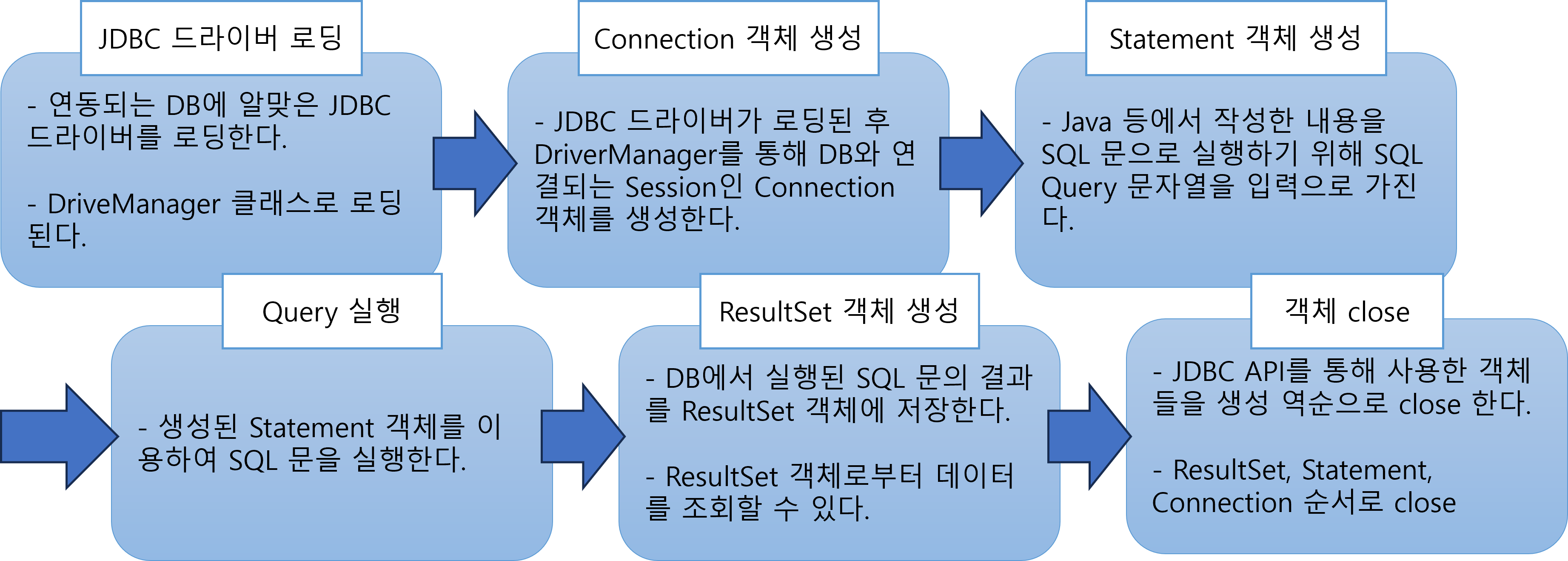
2. JDBC 클래스
| 클래스 | 설명 |
|---|---|
InitialContext |
naming operation을 수행하기 위한 시작 context Oracle Class InitialContext |
| Context 인터페이스를 구현하며, 초기 context가 구성되면 환경(environment)이 생성자에게 전달된 환경 파라미터들로 정의된 속성(property)으로 초기화 | |
Context |
Request 수행에 사용되고, 이름과 객체 바인딩으로 이루어져 있는 인터페이스 객체 Oracle Interface Context |
DriverManager |
DB Driver를 관리하고 연결을 생성하는 클래스 |
DataSource |
DataSource 객체가 나타내는 물리 데이터 소스와의 연결을 위한 객체 Oracle Interface DataSource |
Connection |
데이터베이스와의 연결(Connection)한 객체 Oracle Interface Conntection |
| Connection의 context 내에서 sql문을 실행하고 결과를 반환 | |
Statement |
SQL문 객체 |
PreparedStatement |
미리 컴파일된 SQL문을 나타내는 객체 Oracle Interface PreparedStatement |
| SQL Injection 공격 방지를 위해 Statement 보다 PreparedStatement 사용을 권장 | |
ResultSet |
데이터베이스에 query문을 실행한 결과로 생성되는 결과 set를 저장한 객체 Oracle Interface ResultSet |
SQLException |
JDBC 관련 예외 처리 클래스 |
// Tomcat이 JNDI를 검색하기 위해 필요한 클래스
InitialContext ic = new InitialContext();

// Java에 내장되어 있는 리소스 자원을 검색하는 상수 java:comp/env 로 리소스 조회
Context ctx = (Context)ic.lookup("java:comp/env");

// 검색된 리소스를 통해 필요한 JNDI 자원을 context.xml의 name 속성값으로 검색
DataSource ds = (DataSource)ctx.lookup("jdbc/oracle_test");

// 위에서 지정한 경로로 DB에 로그인 시도
Connection connec = ds.getConnection();

// 실행할 sql문 string
String sql = "SELECT * FROM DEPARTMENTS";

// 문자열 형태의 sql문을 실제 query문으로 변경
PreparedStatement prestat = connec.prepareStatement(sql);

// query문 결과 저장
ResultSet rs = prestat.executeQuery();

// ...
// rs 를 이용한 테이블 속성 저장
// ...

// 사용 후에는 반드시 DB에 연관된 객체는 모두 닫아줘야 함
// 생성했던 역순으로 닫음
rs.close();
prestat.close();
connec.close();
- 아래는 PostgreSQL과 연동 시 JDBC 예제다.
- PostgreSQL과 연동으로 미리 다운로드한 PostgreSQL JDBC 드라이버를 설치한다.
- JDBC Driver를 로드한다.
- DB의 주소, 사용자, 비밀번호 정보를 이용하여
Connection객체를 생성한다. - String으로 작성한 SQL을
PreparedStatement로 DB에 전달할 수 있게 만든다. - SQL을 실행하고
ResultSet으로 결과를 처리한다. - 연결 종료 시
Connection,PreparedStatement,ResultSet을 닫는다(close).- try-with-resources로 자동 close를 설정할 수 있다.
import java.sql.*;

public class PostgresJdbcExample {
    private static final String URL = "jdbc:postgresql://localhost:5432/mydatabase";
    private static final String USER = "myuser";
    private static final String PASSWORD = "mypassword";

    public static void main(String[] args) {
        // 1. (Java 6 이하 필요) 드라이버 로딩 — Java 6 이후는 자동 로딩됨
        try {
            Class.forName("org.postgresql.Driver");
        } catch (ClassNotFoundException e) {
            System.err.println("PostgreSQL 드라이버를 찾을 수 없습니다.");
            return;
        }

        // 2. DB 연결
        // try-with-resources로 finally 없이 자동 close
        try (Connection conn = DriverManager.getConnection(URL, USER, PASSWORD)) {
            // 3. SELECT 예시
            String selectSql = "SELECT id, title, author FROM books WHERE price > ?";
            try (PreparedStatement pstmt = conn.prepareStatement(selectSql)) {
                pstmt.setInt(1, 10000);
                try (ResultSet rs = pstmt.executeQuery()) {
	                // 결과 데이터를 한 줄씩 가져오기
                    while (rs.next()) {
                        int id = rs.getInt("id");
                        String title = rs.getString("title");
                        String author = rs.getString("author");
                        System.out.printf("id=%d, title=%s, author=%s%n", id, title, author);
                    }
                }
            }

            // 4. INSERT 예시
            String insertSql =
            "INSERT INTO books (title, author, price, publish_date) VALUES (?, ?, ?, ?)";
            try (PreparedStatement pstmt = conn.prepareStatement(insertSql)) {
                pstmt.setString(1, "새로운 책");
                pstmt.setString(2, "홍길동");
                pstmt.setInt(3, 15000);
                pstmt.setDate(4, Date.valueOf("2025-06-21"));
                int affected = pstmt.executeUpdate();
                if (affected > 0) {
                    try (ResultSet keys = pstmt.getGeneratedKeys()) {
                        if (keys.next()) {
                            System.out.println("💾 삽입된 새 책의 ID = " + keys.getInt(1));
                        }
                    }
                }
            }

        } catch (SQLException e) {
            e.printStackTrace();
        }
    }
}
3. JDBC 드라이버
- Java 프로그램의 요청을 DBMS가 이해할 수 있는 프로토콜로 변환해주는 클라이언트 사이드 어댑터이다.
- JDBC API가 데이터베이스와 연결되려면 JDBC 드라이버가 먼저 로딩 되어야 한다.
- DB 별로 JDBC 드라이버가 존재하기에 사용하려는 DB에 맞는 드라이버를 선택하여 프로젝트에 적용한다.
4. Connection 객체 생성 과정
- 어플리케이션 로직이 DB 드라이버로 Connection을 조회
- DB 드라이버가 TCP/IP Connection 연결, 3 way handshake 같은 TCP/IP 연결을 위한 네트워크 동작도 발생
- DB 드라이버가 PW와 기타 부가 정보를 DB에 전달
- DB에서 ID, PW를 통해 내부 인증 완료 후 내부 DB Session 생성
- DB는 Connection 생성이 완료 되었다는 응답을 보냄
- DB 드라이버가 이를 통해 Connection 객체를 생성하여 클라이언트에게 보냄
DBCP(DataBase Connection Pool)
미리 DB에 연결(Connection)해둔 객체들을 pool에 저장해 두었다가, 클라이언트의 요청이 있을 때 Connection을 pool에서 꺼내 사용하는 방법
-
참고 자료 : Apache Commons The DBCP Component, devdo's DB 커넥션 풀(DBCP)은 왜 쓰는가?(HikariCP), Naver D2 Commons DBCP 이해하기
-
매 연결 때마다 Connection 객체를 만들며 인증과 응답이 오고 가는 과정을 거치면 시간과 자원 소모가 상당하므로, 미리 Connection 객체를 pool에 생성해둔 후 사용한다.
-
요청이 있을 때만 만들어둔 pool에서 Connection 객체를 사용한 후 반환하므로 DB 연결 부하를 줄일 수 있고, 시간 및 자원 소모가 덜하다.
-
그리고 Connection을 계속해서 재사용하기 때문에 생성되는 Connection 수를 제한적으로 설정할 수 있어 접근하는 사용자의 수를 제어할 수 있다.
-
Java에서는 javax.sql.DataSource 인터페이스를 통해 Connection 획득 방법을 구현할 수 있다.
Singleton 패턴과 DB Pool
- 수업을 통해 DB 연결에 대해 배우던 중 Connection 객체를 Singleton으로 만드는지 궁금했다.
- 이에 대한 멘토님의 답변은 Connection Pool은 Singletone으로 만들어 Connection을 가져오고, Connection을 Singleton으로 만들지 않는다는 것이다.
- 이유는 웹이나 어플리케이션은 Thread가 많이 만들어지는데, 단일 Connection으로만 사용하면 병목 현상이 발생한다.
- 병목 현상으로 인해 데드락(시스템 자체가 죽음)이 생길 수 있어 Connection은 Singleton으로 잘 만들지 않는다.
- 또한 Connection을 Singleton으로 두는 경우에 Transaction도 충돌이 날 수 있다.
JNDI(Java Naming Directory Interface)
디렉터리 서비스에서 제공하는 데이터 및 객체 발견, 참고를 위한 Java API
-
참고 자료 : 위키백과 JNDI, 고코딩's Java JNDI란
-
Java 어플리케이션을 외부 디렉터리 서비스(ex: DB)에 연결하거나, Java applet이 호스팅 Web Container가 제공하는 구성 정보를 참고할 때 사용한다.
-
Servers의 context.xml에서 설정 시(연결 DB는 Oracle DB)
| 옵션 | 설명 |
|---|---|
| auth="Container" | Container가 인증을 처리하도록 지시 |
| name="jdbc/oracle_test" | 데이터 소스의 이름을 지정 |
| type="javax.sql.DataSource" | 해당 데이터 소스가 javax.sql.DataSource 인터페이스를 구현했음을 나타냄 |
| driverClassName= "oracle.jdbc.driver.OracleDriver" |
JDBC 드라이버의 클래스 지정 |
| factory= "org.apache.commons.dbcp .BasicDataSourceFactory" |
데이터 소스 객체를 생성하는 클래스 지정 |
| url= "jdbc:oracle:thin:@localhost:1521:xe" |
jdbc:oracle:드라이버타입:[유저이름/패스워드]@호스트이름[:포트번호][서비스네임] |
| thin : Java 패키지만으로 DB와 바로 연결, OCI보다 느림 | |
| OCI(Oracle Call Interface) : 특정 운영체제 내에서만 돌아가는 모듈로 DB 연결 | |
| username="사용자이름" password="비밀번호" |
DB에 접속할 계정 설정 |
| maxActive="접속인원" | 동시에 활성화된 최대 연결(Connection) 수 |
| maxIdle="자리비움시간" | pool에 유지되는 상태의 사용하고 있지 않은 최대 연결 수 |
| 어플리케이션이 특정 시간 동안 연결을 사용하지 않으면 사용하지 않는 상태가 되며, pool에 반납 | |
| maxWait="대기시간" | pool에서 사용 가능한 연결을 얻기까지 대기할 최대 대기 시간 |
<Context>
<Resource auth="Container"
		  name="jdbc/oracle_test"
		  type="javax.sql.DataSource"
		  driverClassName="oracle.jdbc.driver.OracleDriver"
		  factory="org.apache.commons.dbcp.BasicDataSourceFactory"
		  url="jdbc:oracle:thin:@localhost:1521:xe"
		  username="user" password="1111"
		  maxActive="20" maxIdle="10" maxWait="1"
/>
</Context>